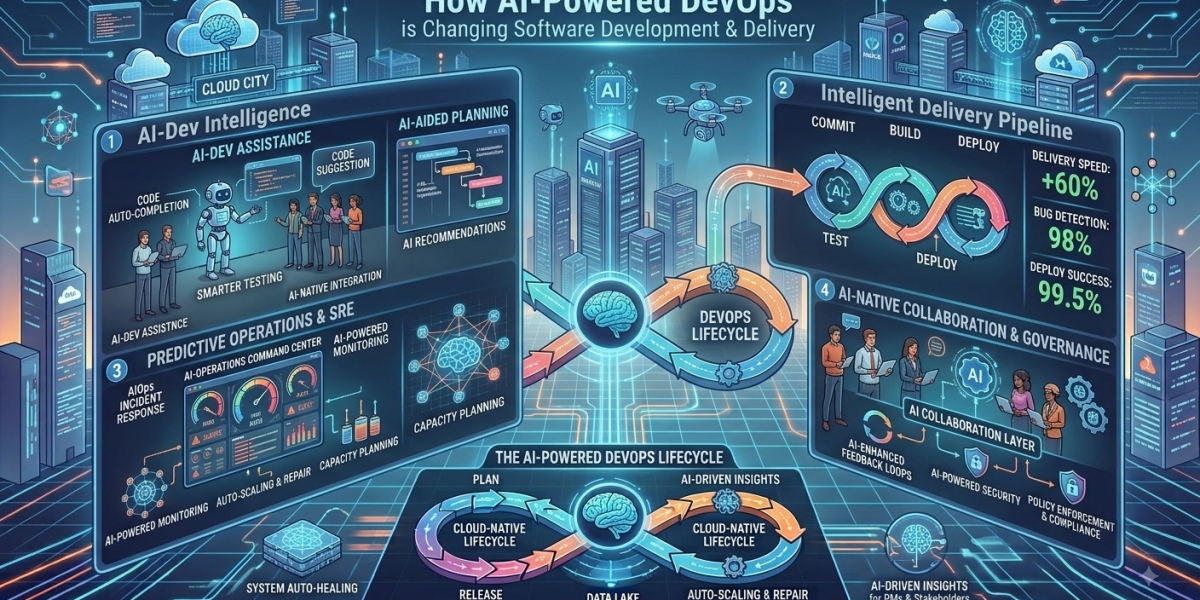

Software development is moving faster than ever. Businesses need to release new features quickly, fix problems before customers notice them, and keep applications secure and reliable around the clock. AI-powered DevOps is helping development and operations teams achieve these goals by bringing artificial intelligence into coding, testing, CI/CD, monitoring, security, and incident management. Instead of relying only on fixed rules and manual processes, teams can use AI to identify patterns, predict risks, automate repetitive work, and make better decisions throughout the software delivery lifecycle.
This does not mean AI is replacing DevOps engineers. Instead, it gives them intelligent tools that can handle time-consuming tasks while engineers focus on architecture, reliability, security, and business priorities. In 2026, this combination of AI and DevOps automation is becoming an important strategy for companies building cloud-native applications, SaaS platforms, APIs, and enterprise software.
API DOTS provides DevOps services and automation solutions designed to help businesses improve CI/CD, cloud infrastructure, monitoring, security, containerization, and software delivery.
What Is AI-Powered DevOps?
DevOps brings development and operations teams together to improve how software is built, tested, deployed, and maintained.
AI-powered DevOps adds artificial intelligence to this workflow.
AI can analyze large amounts of information from:
Source code
Build pipelines
Test results
Application logs
Infrastructure metrics
Security scans
Deployment history
User activity
System alerts
It can then identify patterns and provide recommendations or automate suitable actions.
For example, a traditional monitoring system may simply tell an engineer:
"CPU usage is above 90%."
An AI-powered monitoring system may analyze the situation and indicate:
"CPU usage has increased steadily since the latest deployment. This service is likely experiencing a performance issue."
That additional context can help engineers investigate problems faster.
Why AI Is Becoming Important in DevOps
Modern applications are becoming more complicated.
A single application may contain:
Microservices
APIs
Databases
Containers
Kubernetes clusters
Cloud infrastructure
Third-party services
Multiple deployment environments
There can be thousands of logs, alerts, and performance signals every day.
Humans cannot manually examine all of this information.
AI can process large volumes of operational data quickly and identify unusual patterns that might otherwise be missed.
This makes AI particularly useful for modern DevOps teams managing distributed and cloud-based applications.
How AI Is Changing the DevOps Lifecycle
AI can support almost every stage of the software delivery lifecycle.
1. AI-Assisted Software Development
Developers can use generative AI to support everyday programming tasks.
For example, AI can help with:
Code suggestions
Boilerplate code
Unit test generation
Code explanations
Debugging assistance
Documentation
Refactoring ideas
Suppose a developer needs to create a standard API endpoint.
AI can generate an initial implementation. The developer can then review the code, make changes, test it, and ensure that it follows the application's security and architecture requirements.
The important point is that AI-generated code still needs human review.
AI is an assistant, not the final decision-maker.
2. AI-Powered CI/CD Pipelines
Continuous Integration and Continuous Delivery are central to modern DevOps.
A traditional CI/CD pipeline follows predefined steps.
For example:
Code change → Build → Test → Security scan → Deploy
AI can make this process more intelligent.
An AI-enabled pipeline can help:
Identify risky code changes
Prioritize tests
Detect likely build failures
Analyze previous deployment results
Recommend deployment strategies
Identify unusual pipeline behavior
For example, if a small code change affects a payment service, AI could help identify that the change has a higher risk and recommend additional testing.
This can improve release confidence without requiring every test to be run manually every time.
3. AI Is Improving Automated Software Testing
Testing is one of the strongest use cases for AI in DevOps.
Traditional automated testing already reduces manual effort.
AI can take this further by helping teams determine what should be tested and where risk is highest.
AI-assisted testing can support:
Test case generation
Regression testing
Test prioritization
Defect classification
UI testing
API testing
Test maintenance
Detection of flaky tests
For example, if historical data shows that changes to a particular module frequently create bugs, an AI-powered system can give that area higher testing priority.
This helps QA teams focus their time where it matters most.
4. AI-Powered Monitoring and Observability
Modern applications generate enormous amounts of operational data.
Monitoring tools collect information about:
CPU usage
Memory
Network traffic
Response times
Errors
Database performance
Application logs
Infrastructure health
AI can analyze this information continuously.
Instead of waiting for a human to notice a problem, AI can identify unusual behavior and alert the appropriate team.
For example:
A website normally responds in 200 milliseconds.
Suddenly, response time increases to 800 milliseconds.
AI can compare this behavior with historical patterns and investigate related signals such as database performance, traffic changes, recent deployments, and infrastructure usage.
This makes AI-powered observability useful for proactive monitoring.
5. Predictive Analytics Can Help Prevent Failures
Traditional DevOps often reacts to incidents after they happen.
AI makes it possible to move toward predictive operations.
AI can analyze historical system behavior and look for warning signs.
For example, an AI system may identify a combination of:
Increasing memory usage
More frequent application errors
Slower response times
Growing traffic
Recent configuration changes
Together, these signals could indicate that a service is approaching a failure condition.
The DevOps team can investigate before customers experience a major outage.
This approach is often called AIOps, where artificial intelligence and machine learning are applied to IT operations.
6. AI Can Speed Up Root Cause Analysis
When an application fails, the hardest question is often:
"Why did it fail?"
A large system can produce thousands of logs and alerts during a single incident.
Engineers may spend hours searching through them.
AI can help connect related events.
For example, an AI system might identify a sequence such as:
New deployment → database connection errors → API response slowdown → increased application failures
This does not guarantee that the AI has found the correct root cause.
However, it can give engineers a useful starting point and reduce the amount of manual investigation.
Faster root cause analysis can mean faster recovery.
7. AI Is Improving Incident Management
Incident response is another area where AI can support DevOps teams.
When an incident occurs, AI can help:
Summarize the problem
Identify affected services
Collect relevant logs
Suggest possible causes
Recommend troubleshooting steps
Notify appropriate teams
Generate incident reports
Summarize what happened after recovery
For example, instead of an engineer manually collecting information from five monitoring systems, an AI assistant could provide a short incident summary with links to relevant logs and recent deployment changes.
The engineer can then make the final decision.
8. AI Is Supporting DevSecOps
Security should not be added at the end of software development.
It should be part of the delivery pipeline.
AI can support security teams by analyzing code, configurations, dependencies, and infrastructure for potential risks.
AI-assisted DevSecOps can help with:
Vulnerability detection
Suspicious behavior analysis
Dependency analysis
Security alert prioritization
Secrets detection
Configuration review
Compliance monitoring
However, AI should not be trusted blindly for security decisions.
Security professionals still need to validate important findings and determine appropriate responses.
9. Generative AI Is Helping With DevOps Documentation
Documentation is important but often neglected.
DevOps teams may need to maintain:
Deployment guides
Infrastructure documentation
Runbooks
Release notes
Incident reports
API documentation
Configuration explanations
Generative AI can help create first drafts and summaries.
For example, after a deployment, AI can summarize:
What changed
Which services were affected
Test results
Deployment status
Known issues
Engineers can review and approve the final document.
This can make technical knowledge easier to maintain and share.
10. AI Can Improve Cloud Resource Management
Cloud infrastructure is flexible, but cloud costs can grow quickly.
AI can analyze resource usage and help identify:
Underused servers
Unusual traffic
Over-provisioned resources
Capacity requirements
Performance bottlenecks
Potential cost-saving opportunities
For example, an AI system may identify that a development environment uses high-cost resources overnight even though very few people are using it.
The team can then consider automated scheduling or a different infrastructure configuration.
This makes AI useful not only for performance but also for cloud cost optimization.
AI-Powered DevOps vs. Traditional DevOps
Traditional DevOps already uses automation.
The difference is that AI can add a layer of intelligence to existing workflows.
Traditional automation may follow:
If X happens → Do Y.
AI-powered automation can work more like:
Analyze the available information → identify the likely situation → recommend or perform an appropriate action.
This makes AI particularly useful when the environment is complex and the same situation does not always require the same response.
Still, traditional automation remains extremely valuable.
The best DevOps environments will often combine:
Automation
AI
Human expertise
Monitoring
Security
Clear business rules
Key Benefits of AI-Powered DevOps
Faster Software Delivery
AI can reduce repetitive work and help teams move changes through development and deployment more efficiently.
Better Software Quality
AI-assisted testing and code analysis can help identify potential problems earlier.
Faster Problem Detection
AI can analyze system signals continuously and identify unusual behavior.
Reduced Manual Work
Developers and DevOps engineers can spend less time on repetitive analysis and documentation.
Improved Reliability
Predictive monitoring and intelligent incident analysis can help teams respond to problems faster.
Better Resource Management
AI can help teams understand infrastructure usage and identify optimization opportunities.
More Informed Decisions
Teams can use historical data and operational signals to make better decisions about deployments and infrastructure.
How to Introduce AI Into Your DevOps Strategy
Businesses do not need to transform their entire DevOps environment overnight.
A gradual approach is often safer and more practical.
Step 1: Identify the Biggest Bottleneck
Start by asking:
Where does our software delivery process lose the most time?
It could be:
Testing
Deployment
Monitoring
Incident response
Code reviews
Documentation
Cloud cost management
Start with one area.
Step 2: Collect Reliable Data
AI needs useful data to produce useful results.
Review your:
Logs
Metrics
Deployment history
Test results
Incident records
Infrastructure data
Poor-quality data can lead to poor recommendations.
Step 3: Start With Low-Risk Automation
Begin with tasks such as:
Log summarization
Documentation generation
Test suggestions
Alert classification
Deployment reporting
These use cases can provide value without giving AI complete control over production systems.
Step 4: Add Human Approval
For important actions, require human confirmation.
For example:
AI recommends rollback → Engineer reviews → Engineer approves rollback
This creates a balance between automation and control.
Step 5: Measure Results
Track meaningful metrics such as:
Deployment frequency
Deployment success rate
Lead time for changes
Mean time to recovery
Test execution time
Defect rate
Infrastructure costs
AI adoption should be measured by business and engineering outcomes, not by the number of AI tools installed.
Challenges of AI-Powered DevOps
AI can improve DevOps, but organizations also need to understand its limitations.
Data Quality Problems
AI depends on useful operational data. Incomplete or inconsistent data can reduce the quality of its recommendations.
False Alerts
AI systems can sometimes identify patterns that are not actually problems.
Human validation remains important.
Security and Privacy
Sensitive logs, source code, credentials, and infrastructure information should not be exposed to AI systems without appropriate controls.
Integration Complexity
AI tools need to work with existing CI/CD platforms, monitoring systems, cloud infrastructure, and development tools.
Skill Gaps
Teams need people who understand both DevOps and AI-enabled workflows.
Over-Automation
Not every decision should be automated.
High-risk actions should have appropriate controls and human oversight.
How API DOTS Supports AI-Driven DevOps
API DOTS provides DevOps consulting and automation services covering CI/CD pipelines, infrastructure as code, cloud DevOps, containerization, Kubernetes, microservices, monitoring, security automation, and ongoing optimization.
Its DevOps capabilities can support businesses that want to modernize their software delivery process while improving speed, reliability, scalability, and operational efficiency.
API DOTS also works across AI/ML, cloud, APIs, SaaS, and software development. This broader technical capability can be valuable when AI needs to connect with application infrastructure rather than operate as a standalone tool.
For example, a business could combine:
AI-assisted testing
Automated CI/CD
Cloud infrastructure
Kubernetes
Infrastructure as code
Security automation
Monitoring and observability
The exact combination should depend on the company's application, team, infrastructure, and business goals.
The Future of DevOps With AI
AI is likely to become a deeper part of software engineering and operations.
Future DevOps environments may include more intelligent systems for:
Self-Optimizing CI/CD
Pipelines could use historical data to improve test selection, deployment strategies, and release decisions.
Predictive Infrastructure Management
AI could identify resource problems before they affect application performance.
AI-Assisted Security
Security systems could continuously analyze code, dependencies, configurations, and runtime behavior.
AI Agents for DevOps
AI agents may increasingly support multi-step tasks such as investigating incidents, collecting information, preparing remediation plans, and coordinating workflows.
More Intelligent Observability
Monitoring systems will increasingly move from simply showing metrics toward explaining what is happening and why it may matter.
The goal is not to create systems that operate without people.
The goal is to create systems where humans can make better decisions with the help of intelligent technology.
A Practical Example of AI-Powered DevOps
Consider an online retail application.
During a major sale, website traffic increases rapidly.
A traditional DevOps setup may generate several alerts:
High CPU usage
Increased response time
Database load
API errors
Engineers then investigate each alert manually.
An AI-powered DevOps environment could analyze these signals together.
It may identify that the increased traffic is causing a specific service to become overloaded and recommend scaling that service.
The DevOps engineer reviews the recommendation.
If approved, the infrastructure can scale automatically.
The monitoring system then checks whether performance improves.
This example shows the real value of AI-powered DevOps:
Data → Analysis → Recommendation → Human approval → Action → Monitoring
The technology supports the engineer instead of replacing the engineer.
Final Thoughts
AI-powered DevOps is changing software development and delivery by adding intelligence to processes that were previously based mainly on manual work and fixed automation rules.
From AI-assisted coding and automated testing to predictive monitoring, intelligent CI/CD, incident analysis, cloud optimization, and DevSecOps, AI can help engineering teams build and deliver software more efficiently.
But successful adoption requires more than purchasing an AI tool.
Businesses need reliable data, secure infrastructure, strong DevOps practices, clear processes, and experienced professionals who understand where AI can create real value.
For companies modernizing their software delivery in 2026, the strongest approach is to combine AI, automation, cloud infrastructure, DevOps expertise, and human judgment.
With the right strategy and implementation partner, AI can help turn a traditional software delivery pipeline into a faster, more intelligent, and more reliable engineering system.
Frequently Asked Questions
1. What is AI-powered DevOps?
AI-powered DevOps uses artificial intelligence and machine learning within software development and operations processes. It can support coding, testing, CI/CD, monitoring, security, incident management, and infrastructure optimization.
2. How does AI improve DevOps?
AI can analyze large amounts of development and operational data, detect unusual patterns, predict potential failures, automate repetitive tasks, improve testing, and provide recommendations that help engineers work faster.
3. Can AI automate CI/CD pipelines?
Yes. AI can support CI/CD by identifying risky changes, prioritizing tests, analyzing build failures, recommending deployment strategies, and detecting unusual pipeline behavior. Human approval can still be required for high-risk production actions.
4. Can AI reduce software downtime?
AI can help reduce downtime by detecting anomalies, identifying potential problems earlier, assisting with root cause analysis, and supporting faster incident response. However, results depend on the quality of the monitoring data, infrastructure, and implementation.
5. Will AI replace DevOps engineers?
AI is more likely to change the role of DevOps engineers than completely replace them. Engineers are still needed for architecture, security, complex troubleshooting, business decisions, and reviewing AI-generated recommendations or actions.
6. How can API DOTS help with AI-powered DevOps?
API DOTS provides DevOps consulting, CI/CD automation, cloud infrastructure engineering, Kubernetes and container orchestration, infrastructure as code, DevSecOps, monitoring, observability, and other DevOps capabilities. These services can support businesses modernizing their software delivery workflows with automation and AI.