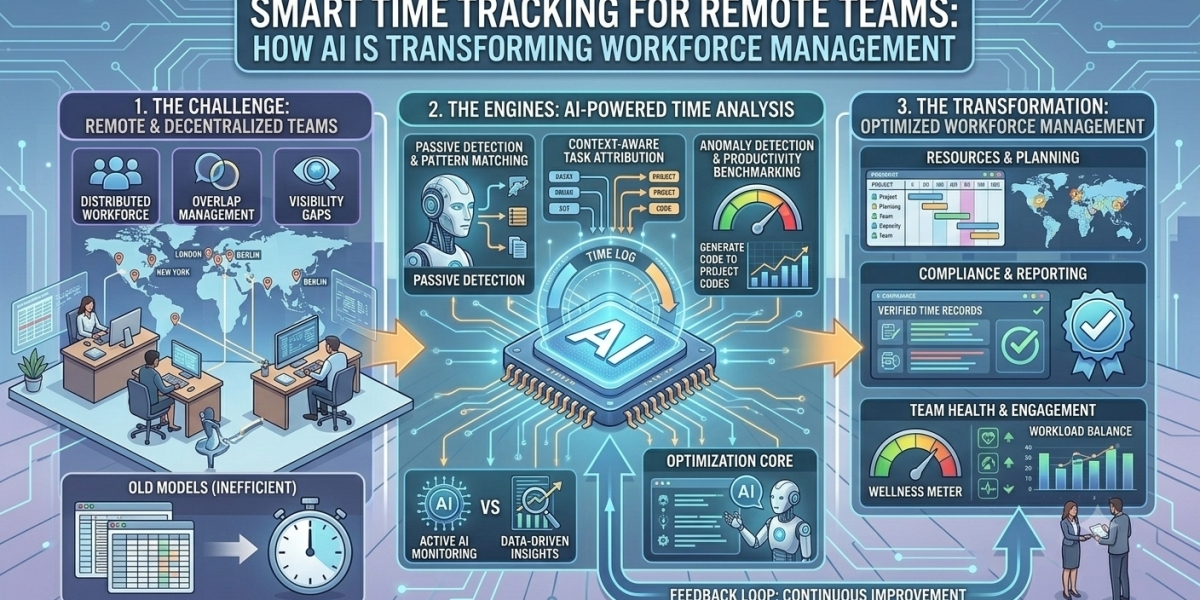

Remote and hybrid work have changed how businesses manage employees, projects, and working hours. Teams now operate from different locations and time zones, making it more challenging for managers to understand attendance, track project time, and coordinate daily responsibilities.
Traditional timesheets and manual work reports can create additional administrative work. Employees may forget to record their hours, while managers may struggle to understand how time is distributed across different projects.
Modern Time Tracking Software helps businesses simplify these processes through automated work-session records, activity insights, and digital reporting. When combined with intelligent analytics, it can provide better visibility into how remote teams work.
The purpose of smart time tracking is not to measure employee value through online presence alone. It is to help businesses maintain accurate records, manage projects, and make informed workforce decisions.
What Is Smart Time Tracking Software?
Smart time tracking software is a digital solution that helps businesses record working hours, understand time allocation, and manage employee activity.
Depending on the platform, it may provide features such as:
Automatic time tracking
Project and task-based time records
Active and idle time detection
Attendance reports
Productivity insights
Work diaries
Exportable timesheets
Some advanced workforce platforms also use analytics to identify activity patterns and highlight changes in work behavior.
These capabilities help managers understand how working time is distributed across employees, projects, and departments.
How AI and Automation Are Changing Time Tracking
1. Reducing Manual Timesheet Work
Manual timesheets require employees to enter their working hours regularly.
This process can become difficult when employees manage several projects or switch between multiple responsibilities.
Automated tracking tools can record work sessions in the background, reducing repetitive manual entries and helping businesses maintain more consistent records.
2. Providing Better Activity Insights
Modern tracking platforms can use activity signals to distinguish active computer usage from periods of inactivity.
This provides additional context about tracked working time.
However, activity information should be interpreted carefully. Meetings, reading, planning, and offline tasks may not always produce continuous computer activity.
3. Improving Project Time Management
Project-based time tracking connects working hours with specific projects or tasks.
Businesses can review how much time different activities require and use this information to improve project estimates and resource allocation.
For agencies and service providers, this can also help understand how working hours are distributed across client projects.
4. Identifying Productivity Trends
Workforce analytics can organize time and activity information into reports.
Managers can review changes in working patterns, focus sessions, and team activity over selected periods.
These insights can help identify areas where processes or schedules may need improvement.
5. Simplifying Workforce Reporting
Automated reports reduce the need to collect information from multiple spreadsheets and manual updates.
Managers can use organized records to review attendance, working time, and project activity more efficiently.
Why Remote Teams Need Smart Time Tracking
Better Visibility Across Locations
Managers can review working activity without depending entirely on physical office presence.
More Accurate Project Records
Task-based time tracking helps businesses understand how much time is spent on different client projects and internal activities.
Improved Team Coordination
Shared reports help managers understand project progress and identify tasks that may need additional attention.
Easier Attendance Management
Digital attendance records make it easier to review working days, schedules, and recorded working sessions.
Better Workload Planning
Historical time records help businesses estimate project requirements and distribute responsibilities more realistically.
Best Practices for Implementing Time Tracking in Remote Teams
1. Explain the Purpose of Tracking
Employees should understand why the business uses time tracking and what information is collected.
2. Choose Features That Match Business Needs
Select a platform that supports actual requirements, such as project tracking, attendance management, or activity reports.
3. Connect Time Records With Projects
Encourage employees to associate their work sessions with relevant projects and tasks.
This makes reports more useful for project planning and time allocation.
4. Review Reports Regularly
Managers should review trends and investigate unusual changes instead of reacting to individual data points.
5. Respect Employee Privacy
Use transparent monitoring policies and avoid collecting information that is not necessary for legitimate business purposes.
6. Focus on Results
Time tracking should support project delivery and workforce planning. It should not replace the evaluation of work quality, creativity, collaboration, and completed outcomes.
How TrackDots Helps Remote Teams Manage Time
TrackDots provides automatic time tracking and workforce management features for remote, hybrid, and office-based teams.
Its desktop agent supports macOS and Windows and records work activity in the background. The platform provides work-session records, active and idle time breakdowns, work diaries, application activity insights, and exportable reports.
Managers can review employee activity through a team dashboard, while employees can access their own work information through supported self-view features.
TrackDots also supports project and task tracking, allowing businesses to understand how time is distributed across different work responsibilities.
These capabilities help remote teams maintain organized time records and give managers a clearer picture of daily work activity.
Conclusion
Smart time tracking is becoming an important part of modern remote workforce management. Automation can reduce manual timesheet work, improve project records, and provide better visibility into working patterns.
However, businesses should use time tracking as a management tool rather than a measure of employee value. Combining accurate records with transparent policies, realistic expectations, and outcome-based performance reviews can create a more effective remote working environment.
TrackDots helps businesses manage remote and hybrid teams through automatic time tracking, activity insights, and workforce reporting.
Frequently Asked Questions
1. What is Time Tracking Software?
Time Tracking Software helps businesses record employee working hours, track project time, manage attendance, and generate workforce reports.
2. How does automatic time tracking work?
Depending on the platform, automatic time tracking uses a desktop or mobile application to record work sessions and relevant activity without requiring employees to enter every time entry manually.
3. Is time tracking useful for remote teams?
Yes. It helps remote teams maintain work records, understand project time, coordinate responsibilities, and review attendance across different locations.
4. Can time tracking software improve productivity?
It can support productivity by identifying time-management challenges, improving project planning, and reducing manual reporting. Actual improvements depend on how businesses use the information.
5. What features should remote teams look for in time tracking software?
Useful features include automatic time tracking, project-based records, attendance management, active and idle time insights, employee dashboards, and exportable reports.